Track Day Analysis — FAQ
Everything you need to know about getting your data in, what you can do with it, and how sharing and privacy work.
The basics
What is Track Day Analysis?
A free, browser-based tool for HPDE and track-day drivers to visualize and analyze their lap data. Upload your telemetry, see your line on an interactive map, overlay laps, compare with other drivers, sync onboard video, and share — all without installing anything.
Is it really free? What's the catch?
It's genuinely free — no subscription and no hardware to buy. It's built and run by a track driver as a contribution to the community, not as a business.
Do I need an account?
No — you can upload a session and explore it without creating one. A free account unlocks sharing your data, uploading and rendering overlay videos, the leaderboard, comments, and saved panel layouts that follow you across devices.
Who built it, and how do I report a bug or request a feature?
It's built by an experienced HPDE driver and SCCA Chief Instructor. Found a bug or have an idea? Email joseph.obernberger@gmail.com — feedback directly shapes what gets built next.
Getting your data in
What data formats are supported?
Channels are detected automatically from:
- AiM — RS3 CSV, XRK binary, and SmartyCam3 MP4
- MoTeC i2 (.ld / .ldx)
- RaceChrono Pro
- Harry's LapTimer (VBO)
- Garmin Catalyst CSV
- Legacy SmartyCAM MOV
Do I have to export from RS3 first?
No. You can upload the raw AiM XRK file directly — no RS3 export step needed — or upload an RS3 CSV if you already have one.
Can I merge ECU data (Haltech, etc.) with my logger data?
Yes. Upload any flat ECU CSV and it's time-aligned to your session automatically by cross-correlating a shared channel like RPM. Its unique channels — oil pressure, knock, lambda, cam angles — are then added alongside your logger's, so you can chart them together.
Which loggers and devices work?
AiM Solo / Solo 2 and other AiM units, MoTeC, RaceChrono, Harry's LapTimer, Garmin Catalyst, and VBOX — plus onboard video from GoPro, phones, Insta360, DJI, and similar.
I don't have a logger yet — what should I get?
Track Day Analysis specializes in AiM data, and the AiM Solo 2 DL is a great place to start — GPS lap timing plus the channels this kind of analysis needs. You can pick one up from Trailbrake.
What you can do
How do I visualize my laps?
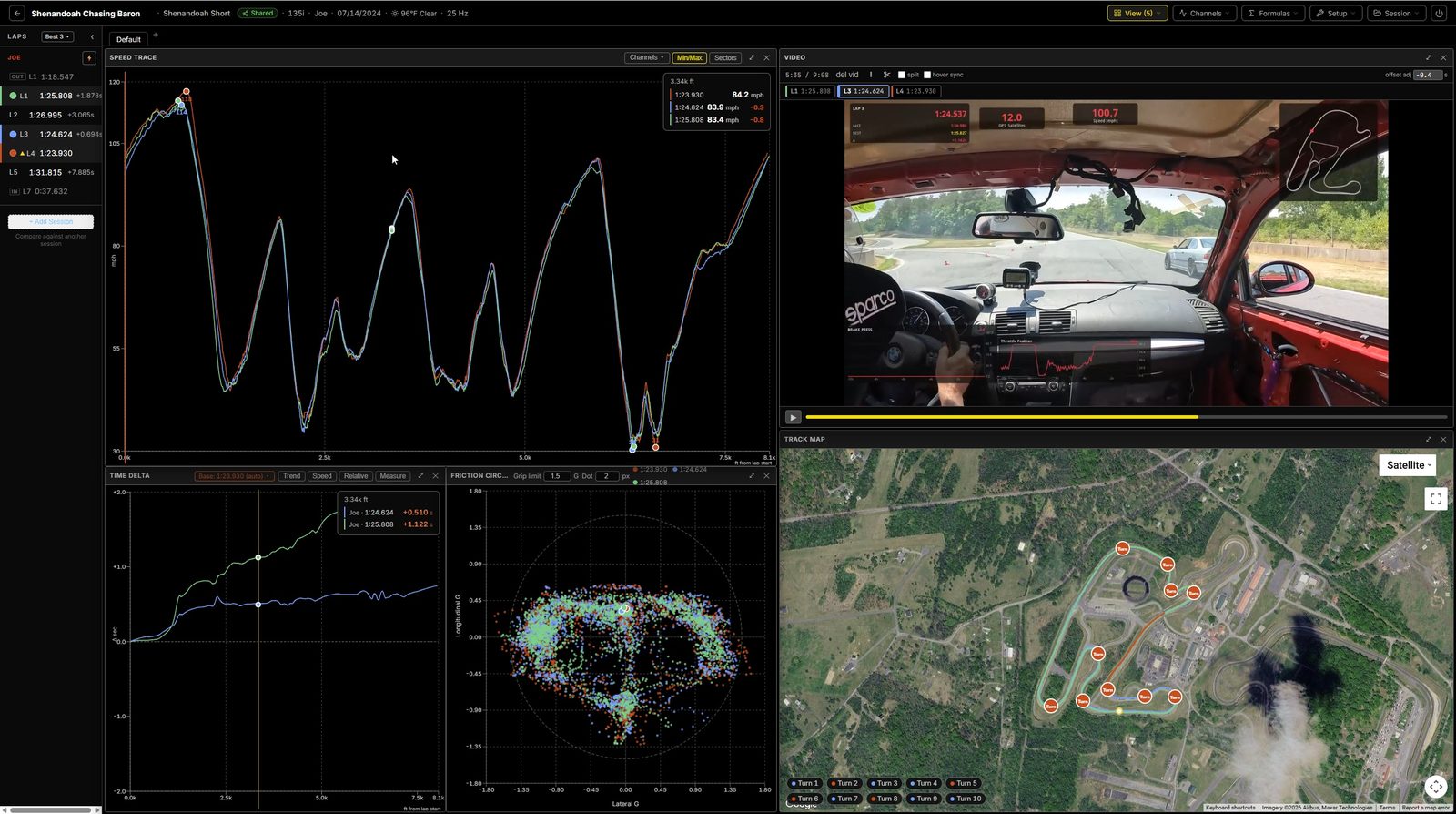
Your GPS line renders on an interactive map, color-coded by lap, speed, or throttle. Overlay multiple laps and arrange configurable panels — speed, lateral/longitudinal G, a friction circle, time delta, and every logged channel — in a layout that's saved to your account.
Does it find corners and analyze them?
Yes. Corners are detected automatically and saved per track, so they're reused at every session there. Per-corner metrics include brake point, minimum speed, throttle pickup, trail-braking, friction-circle use, and time delta versus a reference lap. Sector times and a theoretical-best lap are included too.
What's the leaderboard?
It ranks every lap across your own and shared sessions for a given track — lap time, top and average speed, peak Gs, traction-circle use, per-corner minimum speeds — filterable by vehicle, with up to four-session compare so you can see exactly where the time difference is.
Can I track my improvement over time?
Yes — the Driver Progress view shows cross-session trends at the lap and per-corner level, so you can see where you're actually getting faster across the season.
What's the car-health icon on my session list?
A quick engine-health screen from the channels your logger or ECU already recorded — oil pressure, oil and coolant temperature, knock, mixture at full throttle, charging voltage and fuel pressure. Green means every rule that could run passed; amber and red point you at the lap and the moment. Every rule and threshold is spelled out on the Car Health Check page.
What's the virtual dyno?
An estimate of your wheel horsepower from a coastdown force-balance model, corrected for road grade using a per-track elevation curve — no dyno time required.
Can I create my own channels?
Yes. The formula editor lets you build custom computed channels from your existing data and chart them like any native channel.
Can I compare myself to other drivers, corner by corner?
Yes — the Head-to-Head panel lines up to four drivers' best laps and shows exactly how much time you gain or lose in each corner against the fastest lap, split into entry and exit, along with the technique behind it: minimum speed, brake point, brake-release, coasting time, trail-braking, and peak brake G. Hover any corner to highlight it across every trace and the track map, and export a one-click PNG report card.
Can the AI give me feedback?
Yes, and it's free. When you compare drivers in the Head-to-Head panel, press Get AI Feedback and it summarizes where you're losing the most time and what to change, corner by corner — for example "brake lighter and release over more distance," "carry more minimum speed," or "get back to power sooner." The AI runs on our own server using a local model, so your data isn't sent to any outside AI service. (Today the AI feedback is for driver-vs-driver comparison; feedback on your own laps is in the works.)
How does video work?
Attach onboard footage and it's synced to your data automatically, with a live data overlay (speed, RPM, G-force, and more) that moves with the video. You can export a clip of your best lap with the overlay baked in to download and share. More on video sync →
Devices & support
Does it work on mobile or iPad?
Yes. It runs in any modern browser with a dedicated mobile layout — handy for reviewing your data on a phone or iPad between sessions.
Which browsers are supported?
Current versions of Chrome, Firefox, Safari, and Edge. If video won't play, try a hard refresh or another browser; if it persists, email the address above.
I have a question that isn't here.
Email joseph.obernberger@gmail.com — happy to help.
Ready to try it?
Upload your last session and explore it — free, no account required to start.
Get started — free